


Table Of Contents
- What Are The Top Benefits Of Selling On Flipkart?
- 1. Massive Visibility
- 2. Smart Advertising
- 3. Fast Payments
- 4. Super-Fast Shipping (FBF)
- Flipkart Seller Account Login: Who Is Eligible For The Seller Account?
- What Are The Essential Documents You Need For A Flipkart Seller Account Login?
- For Sole Proprietors
- For Private Limited Companies
- For Partnerships Or LLPs
- What Are The Products You Can Sell On Flipkart?
- Flipkart Seller Account Login: A Comprehensive Guide To Set Up Your Login Account
- Getting Started With Flipkart Seller Login In Chrome
- Quick And Easy Registration
- Step-By-Step Sign-Up
- Ready To Sell
- How Can You Manage And Login To Your Flipkart Seller Hub?
- Step 1: Access the Seller Hub
- Step 2: Log In with Ease
- Step 3: Unlock Your Store’s Potential
- Step 4: Collaborate Efficiently
- How Can You Empower Your Team On The Flipkart Seller Hub?
- Adding a New User
- Removing a User
- Benefits of User Management:
- How Can You Start Selling On Flipkart?
- 1. Enter Contact Details
- 2. Enter GSTIN or PAN
- 3. Create a Strong Password
- 4. Verify Email Address
- 5. Enter Your Signature
- 6. Store and Pickup Details
- 7. Bank Details
- 8. Create New Listing
- What Do You Need To Follow To Overcome The Barriers As A New Seller On Flipkart?
- 1. GSTIN Already Registered
- 2. Pincode Serviceability
- 3. Pick the Right Category
- 4. The "Feel Factor" in Photos
- 5. Smart Tax Savings (ITC)
- What Is Flipkart's Commission Structure?
- 1. Closing Fees
- 2. Shipping Fees
- Why Flipkart’s Fees are Better:
- How Can You Calculate Your ROI On Flipkart?
- Flipkart and Its Reconciliation Policies: An Overview
- 1. Data You Will Need
- 2. How To Check
- 3. Understanding The Results
- How Can You Take Advantage Of The Big Billion Sale on Flipkart?
- 1. Fulfillment by Flipkart (FBF)
- 2. Smart Pricing Strategy
- 3. Flipkart Ads
Flipkart Seller Account Login: Master The Flipkart Seller Hub And Reach Millions Nationwide
If you have ever thought about turning your business idea into a reality, Flipkart can be a great place for you!
At present, they have over 50 satisfied customers.
So, whether you are a local artist or a budding entrepreneur, Flipkart can make it easier for you to reach India’s 19,000+ pin codes.
If you are already familiar with platforms like the Meesho supplier hub, you’ll find Flipkart’s reach and professional support a massive boost for your brand.
It is very easy to start with the process! You can set up your profile in just 10 minutes.
All you need is a valid GST number and at least one product to list. Once you are in, you get 24/7 support and dedicated managers to help you grow.
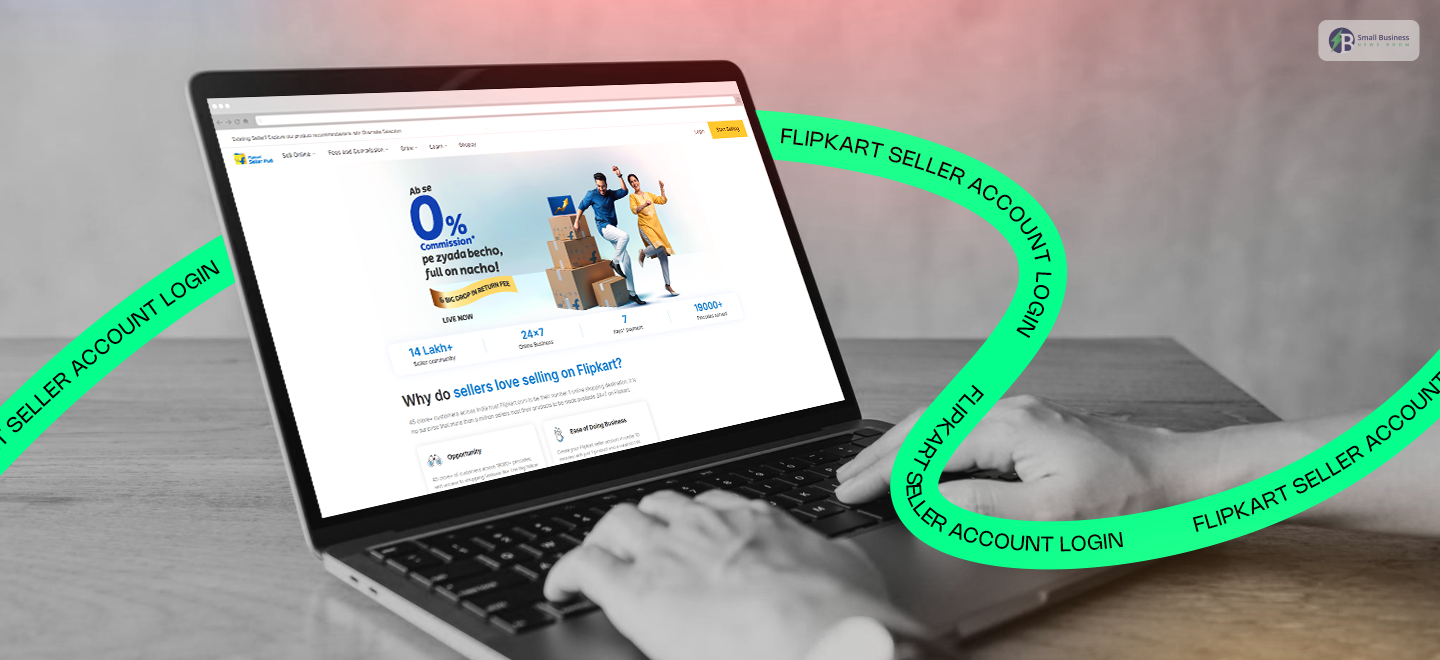
You can simply head to the Flipkart seller account login page whenever you are ready. This way you can
- Manage your orders,
- Track your sales
- Use tools like Flipkart Ads to boost your visibility.
The platform handles the heavy lifting so you can focus on your products. It starts from low commission rates to 3,000+ delivery hubs.
India’s e-commerce market is booming, do not miss out! So, start your journey today and watch your business scale.
What Are The Top Benefits Of Selling On Flipkart?
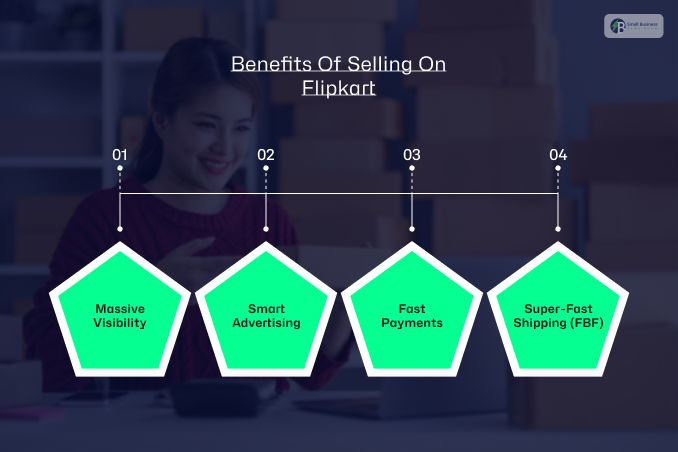
Flipkart is a goldmine for your business, with over 50 crore shoppers. If you are not there yet, you are missing out! Here is why jumping on board is a game-changer:
1. Massive Visibility
Now, your own website might grow slowly. However, Flipkart puts your products in front of millions instantly.
It owns over a third of India’s e-commerce market. This is what gives your brand the spotlight it deserves.
2. Smart Advertising
Now, you have great products. But no one is seeing them? Well, you can use Flipkart Ads to reach the right people. Moreover, it is the easiest way to boost your sales and get noticed.
3. Fast Payments
Third comes the fast payments. Cash flow is king! Flipkart pays you just 7 days after dispatch. This is unlike other sites with long waits.
4. Super-Fast Shipping (FBF)
Your items stay in warehouses closer to customers, with Flipkart Fulfillment (FBF). This means lightning-fast delivery and happy shoppers.
Flipkart Seller Account Login: Who Is Eligible For The Seller Account?
Almost everyone can sell on Flipkart. It is open to almost everyone! Whether you are running a business solo or part of a big company, you are welcome to join.
Here are the groups that can sign up:
- Individual Sellers
- Private Limited Companies
- Sole Proprietorship Firms
The best part? The registration is not a headache. Flipkart keeps it simple. Unlike other platforms that ask for a mountain of paperwork.
Most people only need three main things to get started:
- PAN Card
- GSTIN (GST Number)
- Bank Account Details
Just keep in mind that, depending on whether you are an individual or a registered company, some details may vary.
But once you have these ready, you can quickly head to your Flipkart seller account login and finish the setup. It is truly that easy to start reaching millions of customers!
What Are The Essential Documents You Need For A Flipkart Seller Account Login?

To sign up for and access your Flipkart seller account, you just need a few basic documents. This depends on your business type.
Here’s the simple breakdown:
For Sole Proprietors
Just bring a photo ID (like your PAN or Aadhaar) and a proof of address (like a recent electricity or phone bill).
For Private Limited Companies
You will need your company’s PAN card, registration or incorporation certificate, and a document showing the company’s official address.
For Partnerships Or LLPs
Have your partnership deed, PAN card for the firm, and IDs for the partners ready. A simple utility bill works as proof of address!
Quick Tip: Flipkart only allows brand-new, authentic items, no second-hand goods here! You just have to pick the right product. This is equally important!
This is the secret sauce to your success. Next, we will look at the hottest categories that customers are searching for right now!
What Are The Products You Can Sell On Flipkart?
What can you sell on Flipkart? Almost anything! Here are the top-selling categories to get you started:
- Home Goods: Bedsheets, carpets, and trendy decor.
- Apparel: Cool T-shirts, ethnic wear, and activewear.
- Electronics: Smartwatches, headphones, and gaming gear.
- Automotive: Seat covers, tyres, and vehicle mats.
- Kitchen: Cookware, bottles, and cutlery.
Once you pick your products, just head to your Flipkart seller account login to list them.
The process is super fast. It takes only a few minutes to set up, and your products go live across India in just two hours!
Flipkart Seller Account Login: A Comprehensive Guide To Set Up Your Login Account

Joining Flipkart is super easy and one of the best decisions you can make! It is simple and fast!
Moreover, it puts your products in front of millions of shoppers.
Here is a friendly guide to help you get started without any stress.
Getting Started With Flipkart Seller Login In Chrome
First, open Chrome and head over to seller.flipkart.com and click “Start Selling.” You will just need to share some basic info like
- Your name,
- Phone number
- Your GSTIN.
You also need to tell them where they can pick up your items and list at least one product to get the ball rolling.
Quick And Easy Registration
Here are the steps you can follow for registration:
- Basic Details: Just your name and business type.
- GSTIN: This is your official business tax proof.
- Pickup Address: Where should the delivery person pick up your orders?
- Unique Product: List one item to finish your setup.
Step-By-Step Sign-Up
Here are the steps that you can follow:
- Visit the Site: Go to the portal and enter your mobile number.
- Verify: You’ll get an OTP on your phone—just type it in.
- Pincode: Enter your business location code.
- Upload Docs: Share your GSTIN, a cancelled cheque for your bank details, and a signature sample.
- Bank Check: Flipkart will send a small amount to your account to make sure it’s working.
- List Away: Add your first product with a clear photo and a nice description.
Ready To Sell
Once you are in, use your Flipkart seller account login to manage everything. You just need to use bright photos and set fair prices to really succeed.
Moreover, being quick to answer customer questions also helps you get great reviews!
How Can You Manage And Login To Your Flipkart Seller Hub?
Welcome to the exciting world of selling on Flipkart! Once you understand your dashboard, it becomes easier to manage your online shop.
Furthermore, think of it as your digital command centre where all the magic happens. Here is a friendly guide to getting started.
Step 1: Access the Seller Hub
First, open your browser and head over to the official portal at seller.flipkart.com. This is your gateway to reaching millions of shoppers across India.
Step 2: Log In with Ease
Look for the “Login” button at the top right corner of the page. It’s right next to the “Start Selling” button. Click it, enter your details, and you are in!
Moreover, this Flipkart seller account login is your key to everything from tracking sales to updating your stock.
Step 3: Unlock Your Store’s Potential
Once you are logged in, you will see your Seller Hub dashboard. This is where you handle the
- Day-to-day stuff,
- Listing new products,
- Checking your inventory,
- Processing orders,
- Chatting with your customers.
It is designed to be simple so you can focus on growing your brand.
Step 4: Collaborate Efficiently
You do not have to do it all alone! Flipkart lets you add up to five team members with different roles.
This keeps your account secure while letting others help out.
How Can You Empower Your Team On The Flipkart Seller Hub?
When you are running a business, it is like a team sport! As your shop grows, you will probably want some help.
The Flipkart Seller Hub makes it super easy. It helps to bring teammates on board without sharing your private passwords.
Here is how you can manage your crew like a pro.
Adding a New User
First, use your Flipkart seller account login to get into your dashboard. You just have to look for your name in the top right corner. And then just click on it.
After that, you need to head to “Manage Profile.” From there, just hit “Manage Users” and then “View.”
Click “Add New User” to bring someone new in. You will get to pick exactly what they can do:
- Admin: They can do everything you can.
- Operations Manager: Great for someone handling orders and returns.
- Catalog Manager: Perfect for the person uploading product photos and descriptions.
- Ads Manager: For the teammate running your marketing campaigns.
Just pop in their name, email, and phone number, hit “Save,” and you are all set!
Removing a User
If a teammate moves on, you can easily remove them. You just need to
- Go back to the “Manage Users” section,
- Find their name in the list
- Click the “Delete” button.
A little box will pop up to make sure you’re certain—just click “Delete” again, and they’re off the list.
Important Notes:
Remember, you can only delete people you’ve added yourself. You can’t delete your own main account!
Benefits of User Management:
You will work much faster by sharing the workload. It is also way more secure because you only give people access to what they actually need to see.
Moreover, it keeps your business organized and your stress levels low!
How Can You Start Selling On Flipkart?
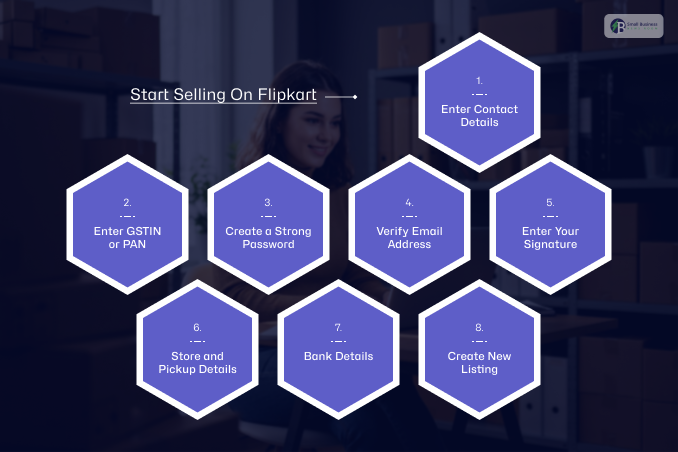
Follow these simple steps to get your shop up and running. It’s easier than you think!
1. Enter Contact Details
First, go to seller.flipkart.com and click “Start Selling.” Type in your mobile number, verify it with the OTP sent to your phone, and add your email address.
2. Enter GSTIN or PAN
Secondly, you need to pick what you want to sell. If it is anything other than books, you’ll need your GST number. For books only, just your PAN works!
3. Create a Strong Password
Always remember to pick a secure password with at least eight characters. It must include a mix of letters and symbols. This keeps your Flipkart seller account login safe.
4. Verify Email Address
After that, you need to check your inbox! Click the verification link Flipkart sends you to confirm your email in seconds.
5. Enter Your Signature
No scanner? No problem! You can either type your name to auto-generate a signature or draw it right on your screen.
6. Store and Pickup Details
You can tell Flipkart your store’s name and where they should pick up your orders. However, you have to make sure the address is clear. This way it would be easier for the delivery folks to find you easily.
7. Bank Details
After that, you have to enter your account number and IFSC code. This ensures you get paid on time for every sale!
8. Create New Listing
The fun part! You just need to upload a great photo and a clear description of your product. Once you hit save, you are officially ready to sell across India.
What Do You Need To Follow To Overcome The Barriers As A New Seller On Flipkart?
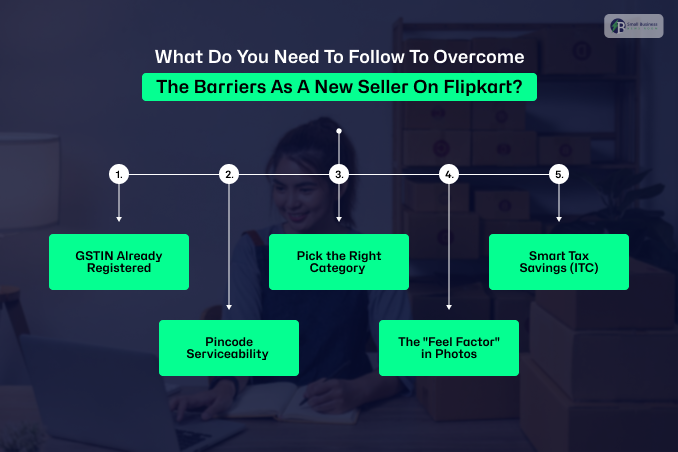
The start might feel a little tricky to you! However, most hurdles can be fixed with a simple solution.
If you get stuck after your Flipkart seller account login, here’s how to handle the common stuff:
1. GSTIN Already Registered
If you see an error saying your GST number is already in use, don’t panic! It usually means it’s linked to an old account.
Moreover, just reach out to Flipkart Support, and they can help clear it up so you can register fresh.
2. Pincode Serviceability
If your specific area is not open for pickups yet, try using a nearby pin code that is serviceable.
Moreover, you just have to make sure the delivery truck can actually reach the address you provide!
3. Pick the Right Category
This is huge! If you list a “serving bowl” as a “storage jar,” customers won’t find it. You just need to pick the right category to ensure your items show up in the right searches.
4. The “Feel Factor” in Photos
People cannot touch your products. Hus, you must show them in action! Instead of just a lamp against a white wall, show it on a bedside table.
Moreover, it helps buyers imagine it in their own home.
5. Smart Tax Savings (ITC)
Lastly, you must not forget about the Input Tax Credit! If you paid GST when buying your stock, you can subtract that from the tax you owe on sales.
Furthermore, this keeps your prices competitive and your profits high.
What Is Flipkart’s Commission Structure?
When you check your profits after your Flipkart seller account login, you will notice Flipkart’s fees are very seller-friendly. Here is the simple breakdown:
1. Closing Fees
This is a small fee charged for every sale. For an item priced ₹500–₹1,000, Flipkart charges about ₹24, while others might charge ₹30. For items over ₹1,000, you save even more!
2. Shipping Fees
Costs depend on how far your package travels. For a 500g parcel, Flipkart is often ₹2 to ₹9 cheaper than the competition.
Why Flipkart’s Fees are Better:
Lower Commissions: On a ₹500 T-shirt, you might pay only 15% commission on Flipkart, compared to 21% elsewhere.
No RTO Charges: If a product isn’t delivered and is returned (RTO), Flipkart doesn’t charge you any extra fees. It’s a huge relief for your budget!
How Can You Calculate Your ROI On Flipkart?
To track your success, check your Flipkart seller account login and use this simple formula:
ROI = (Sales Revenue – Flipkart Costs) / Flipkart Costs
Moreover, do not forget to check Flipkart’s reconciliation policies first! This helps you catch tiny details that new sellers often miss. Moreover, it can ensure your math is 100% spot on.
Related Resource: How to Become a Meesho Supplier? Understand The Pain Points And Uniqueness of the Platform
Flipkart and Its Reconciliation Policies: An Overview
Keeping track of your money is not that difficult! When you log in to your Flipkart seller account, you can use the reconciliation tool to ensure every rupee is accounted for.
Here is how it works:
1. Data You Will Need
First, grab your Order, Sales, Settlement, and Return reports. These tell the full story of your sales.
2. How To Check
Secondly, you must look at your Sales report to see what you should be paid for each order. Remember, sales are pluses and returns are minuses. Compare this to what Flipkart actually sent to your bank.
3. Understanding The Results
Matched: Everything is perfect!
Underpaid: You received less than expected.
Overpaid: You got a little extra!
Missing: No payment has shown up yet.
Flipkart now has a built-in tool. This can automate the process for every order ID, making your business life much easier and more transparent!
How Can You Take Advantage Of The Big Billion Sale on Flipkart?
Big Billion Days is Flipkart’s massive annual sale. It is the best time to supercharge your business. Here’s how to make the most of it:
1. Fulfillment by Flipkart (FBF)
When you use FBF, Flipkart handles the storage and shipping. Customers trust these products more.
Moreover, they know the delivery will be fast and safe. Plus, it gives your items a huge boost in search results!
2. Smart Pricing Strategy
Pricing is everything during a sale. You can create a little “friendly competition” by listing similar items at higher prices under different names.
This also makes your main product look like an irresistible deal. Moreover, it encourages shoppers to click “buy” on your best offer.
3. Flipkart Ads
To stand out in the crowd, use Flipkart Ads. After logging in to your Flipkart seller account, set up ads to place your products at the top of search results. Moreover, it is the fastest way to get noticed by millions of festive shoppers!
Additional Resources:


