Table Of Contents
- What Is Snap Planet Order?
- What Is The Snapchat Friend Solar System? Explained
- How Can You View The Snapchat Friend Solar System?
- The Line Up Of Snap Planet Order
- How Exactly Does The Snap Planet Order Work?
- Why People Are Obsessed With This?
- How Can You Enable The Snap Plane Order Feature?
- Step 1: Go To Your Profile
- Step 2: Find The Snapchat+ Section
- Step 3: Look For A Friend Solar System
- Step 4: Turn It On
- Is Snapchat+ Worth It?
- 1. Power Users
- 2. Social Butterflies
- 3. Casual Users
Why Are You Neptune On Their Profile? Learn Everything About Snap Planet order!
Social media changes daily. However, Snapchat keeps things fresh with fun tools. Their latest buzz is the Snapchat Solar System.
Well, I could not stop my serious self! And I have learned how it turns your friend list into a digital galaxy.
The system uses a specific snap planet order. It just ranks your closest connections. If you are someone’s “Sun,” they are one of your top eight friends.
Each planet represents your ranking on their Best Friends list.
For example, being Mercury means you are their absolute closest friend. At the same time, Neptune puts you in the eighth spot.
I found that these cosmic rankings offer a quick, visual way to see where you stand with others.
It is more than just a decoration. You can say it reflects your daily interactions. So, once you understand the lineup, it helps you navigate your social circle with ease.
What Is Snap Planet Order?
The Friend Solar System is a cool Snapchat+ feature that visualizes your top eight friends.
As I said, I have been using this feature for quite a while! While using this, I have seen firsthand how it turns your social circle into a mini galaxy.
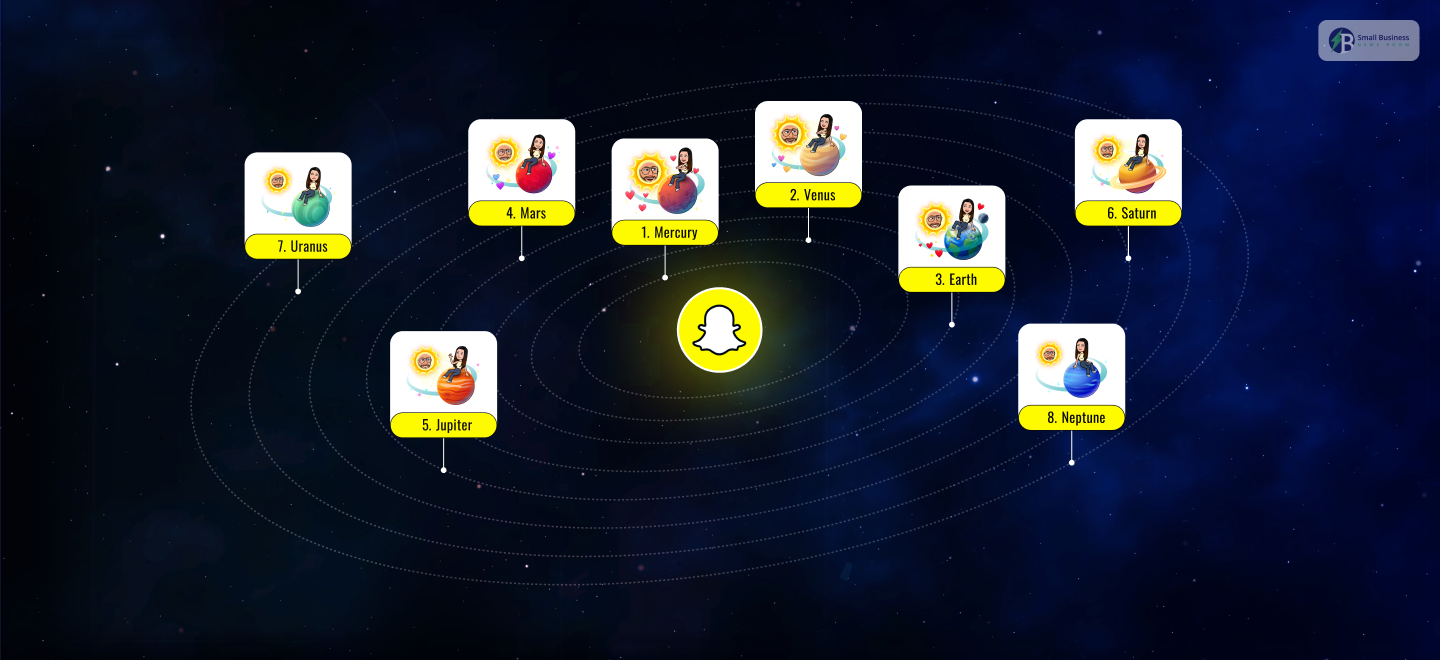
In this system, you are the Sun, and your best friends orbit you as planets.
Your Snap Planet order depends entirely on how much you interact.
For instance,
- Your #1 best friend is Mercury because it is the closest planet to the Sun.
- On the other hand, your eighth closest friend appears as Neptune, the farthest one out.
Each planet has a distinct look. They feature unique colors and patterns, such as hearts or rings.
The lineup is always changing. It is a simple, visual way to track your strongest connections, because the rankings update based on your recent chats and Snaps.
What Is The Snapchat Friend Solar System? Explained
In my experience, the Snapchat Solar System is a clever way to visualize your social circle.
You just think of yourself as the “Sun.” Now, your eight closest friends orbit you as different planets based on how much you interact.
The snap planet order is strictly based on your friendship rank. It represents your #1 best friend, because Mercury is the closest planet to the Sun.
Consequently, Venus is your second closest friend. This is how the list continues until you reach Neptune, who is your eighth-best friend.
I have noticed that this system makes it very easy to see who you chat with most at a glance.
These positions are not permanent, since your interactions change daily. Their planet might drift further away or disappear from your galaxy entirely if you stop snapping someone.
It is a dynamic and fun way to keep track of your digital bonds.
How Can You View The Snapchat Friend Solar System?

Now, let’s talk about the big elephant in the room! How can you see the Snapchat friend solar system?
Well, you first need a Snapchat+ subscription. From my experience, the easiest way to check your status is by looking for a badge on a friend’s profile.
If you see a gold-bordered “Best Friends” badge, it means you both are in each other’s top eight.
However, a “Friends” badge means you are in their top eight. They are not in yours. When you tap these badges, you will see the snap planet order and find out which planet you are on.
It is a quick way to see where you stand in their “universe.” Just remember, these badges only appear if you are a paid subscriber.
The Line Up Of Snap Planet Order
When you dive into the Snapchat+ experience, the snap planet order becomes a fascinating way to track your social life.
Based on my time using the app, I have realized that this feature is not just about pretty graphics. It is about a live map of your most consistent digital connections.
Each planet corresponds to how often you send Snaps and chats.
Here is a breakdown of the full solar system:
| Planet | Rank | Friendship Description | Visual Markers |
| Mercury | #1 | Absolute best friend. Most snaps and chats. | Five red hearts and sparkles |
| Venus | #2 | Very close friend; frequent daily interaction. | Pink, yellow, and blue hearts |
| Earth | #3 | Consistent and reliable top-three friend. | Small moon and red hearts |
| Mars | #4 | Active friend; regular streaks and messages. | Red planet with blue/purple hearts |
| Jupiter | #5 | Close buddy; occasional jokes and stories. | Orange planet with stars |
| Saturn | #6 | Inner circle: casual or periodic interactions. | Orange planet with famous rings |
| Uranus | #7 | Casual friend; sporadic memes or updates. | Greenish-blue with no hearts |
| Neptune | #8 | Edge of top-tier; rare but steady contact. | Deep blue with minimal stars |
How Exactly Does The Snap Planet Order Work?
After testing the premium features, I think the Snap Planet order is a fantastic way to visualize your social interactions.
This setup is only available for Snapchat+ subscribers. After you subscribe, your friend list becomes a digital galaxy where Bitmojis play cosmic characters.
Among other things, I found the following:
- Real-Time Updates: The lineup changes by itself. If you snap someone more today, they will be even closer to your “Sun.”
- Visual Fun: Seeing your friends change their looks according to different planets makes the app more exciting.
- Engagement Tracking: It’s an easy way to see who you really talk to most and who is just a contact.
In a nutshell, instead of a boring contact list, it becomes a game. It’s less a matter of a static ranking and more about your relationships growing or dying with time.
Why People Are Obsessed With This?
Honestly? I spent quite a bit of time messing around with the Snapchat+ subscription, and I totally get why the snap planet order is trending everywhere.
Definitely, it goes beyond just a list of names. It is like a mini, engaging story unfolding right on your phone.
These are the reasons why I believe this feature can be quite addictive from my personal experience:
- It is Visually Fun: Instead of a dull text list, your friends revolve around you literally. Recognizing your bestie as the bright, rotating Mercury makes your social circle a “space show” sort.
- Friendly Competition: Honestly, we all sneak a peek to confirm if we are still someone’s #1. Trying to shift from Venus to Mercury sparks a playful rivalry that keeps the Snaps coming.
- The “VIP” Feeling: Because this is a paid benefit, there is a feeling of exclusivity. It is like you are a member of a secret club, which makes people curious to join and have their own galaxy.
- It Feels Personal: Small things like hearts on Mars or rings on Saturn make the leaderboards feel intimate. It is a graphic illustrating the amount of friendship you have invested.
Personally, I think Snapchat really got the psychology here. They’ve basically turned a normal messaging app into a game by associating our chat patterns with these trendy graphics.
You end up opening the app every day just to check whether your Snap Planet placement has changed.
It satisfies that very basic human need to know our status among the people we love the most.
It’s more than a trick. It’s a viral instrument that keeps the community engaged. Whether you are a student or an influencer, watching your digital universe grow is pretty fun.
How Can You Enable The Snap Plane Order Feature?
If you’d like to test the Snap Planet feature through an order for yourself, you must first be a Snapchat+ subscriber.
From my side, I think the whole process of configuring the settings was super fast, and I didn’t face any difficulty. Here’s the rundown of how I got it up and running:
Step 1: Go To Your Profile
The very first thing you have to do is open your Snapchat app and then tap your Bitmoji in the top left corner.
This takes you to your profile page, where you can handle your personal account settings and app preferences.
Step 2: Find The Snapchat+ Section
Next, you’ll need to locate the Snapchat+ banner directly under your name.
All you have to do is tap it to access the exclusive menu. Members’ premium tools and cosmic features are housed here.
Step 3: Look For A Friend Solar System
When finished, all you have to do is go through the list of features to check out the Friend Solar System option.
In case of non-subscription, the button will simply be locked or appear grayed out to you.
Step 4: Turn It On
Lastly, you must simply tap the toggle switch to enable the feature.
Once it turns green, the system is active. Now you can view your friends’ profiles to see their unique planet rankings.
Also Check: 11 Social Media Management Tools for a Strong Social Presence
Is Snapchat+ Worth It?
If I am asked to give my opinion, I would say the value of Snapchat+ relative to its cost is largely determined by your app usage.
At a rate of approximately $3.99 a month, you receive the Snap Planet order and other exciting perks, such as custom icons.
This is my unvarnished opinion on who the subscriber should be:
1. Power Users
If you are a creator or an influencer, I can tell you that Story Boosts and AI tools are quite handy.
They provide you with extra exposure and the freedom to be more creative, which are the features lacking in the free version.
2. Social Butterflies
For fans who follow the evolution of their friendships, the Solar System feature is a must. It unveils a layer of closeness in your daily chats, making the app more enticing.
3. Casual Users
If you only glance at the app once a day, the price may not be reasonable for you. To be clear, the subscription doesn’t remove ads, which, for some people, is a deal breaker.
Basically, if you are after the privilege of being the first to try new features and, at the same time, more ways to make your profile pop, then it is really a small price to pay for all the fun.
Additional Resource: Why Everyone Is Switching To Timslapt2154 (And Why You Should Too)