Table Of Contents
Don’t Let Your Business Pause: The Smart Entrepreneur’s Guide To Tracking GST ARN Status
Once you submit your formal GST registration application on the government portal, it is a matter of patience, as processing your request takes time.
However, the GST portal generates a 15-digit alphanumeric code to help you track your approval request.
In addition, checking the ARN status helps you stay up to date on your application’s progress.
For instance, the approval process takes three to seven working days, and your portal dashboard gives you updates such as ‘Pending for processing’ or ‘Clarification required.’
However, this can be misleading, as the officer might ask for additional documents, so it’s essential to understand the tracking process for your GST Registration.
That is why we have compiled guidelines on GST ARN status, including how to interpret and resolve GST application-related issues.
What Does ARN Status Mean in GST?

Your GST ARN Status shows exactly where your business registration stands during the government review process.
After you submit your form and verify your OTPs, the portal issues a unique 15-character tracking code.
Meanwhile, this number acts like a live tracking link for your official application until a final decision is made.
However, keep in mind that this code is completely different from a permanent GSTIN.
Instead, it simply confirms that the network accepted your initial paperwork.
Consequently, checking this update under the portal’s Services tab tells you whether the tax officer needs clarification or your final approval is ready. It gives you full visibility over your tax setup.
Why Are These Numbers Important?

Knowing your ARN Status is incredibly important because it acts as your temporary business lifeline.
Since the full registration review can take a few days, this unique code serves as your temporary valid identity.
Meanwhile, it offers massive benefits for your day-to-day setup:
- Proves Legitimacy: It helps prove your authenticity to partners by showing you have submitted real official documents like your PAN and MOA.
- Business Continuity: You do not have to put your entire business on pause during this waiting period.
However, vendors can actually use this number to start providing goods and services without a permanent GSTIN. On the other hand, you must stay compliant. Consequently, you just need to issue updated invoices once your final tax number arrives. It keeps your operations running smoothly from day one.
The Types Of Arn Status For GST Application Status
Understanding ARN status for GST applications is essential for prospective taxpayers, since processing your approval request can take a few days.
Therefore, knowing the implications of every status code that appears on your dashboard is vital so you can take appropriate action if the GST network requires clarifications on your submission.
Nevertheless, the following guidelines will help you understand the meaning of every code:
| Status Code | What It Means for You | Next Step |
|---|---|---|
| Pending for Processing | This is the first step in the processing stage, and your application is on hold for screening. | Wait for the initial review. |
| Site Verification Assigned | The department has scheduled a physical visit to check your business location. | Ensure your office is ready. |
| Site Verification Completed | The visiting officer has successfully submitted their field report. | Wait for final processing. |
| Pending for Clarification | The tax officer found an issue and sent a notice asking you to explain it. | Reply to the notice quickly. |
| Clarification Filed – Pending for Orders | You submitted your answers, and you are now waiting for the final judgment. | Wait for the final decision. |
| Clarification not Filed – Pending for Order | You missed the deadline to reply, so the officer is preparing to reject it. | Prepare to file a new form. |
| Approved | The office approved your application, and your GSTIN is on the way. | Start using your GSTIN. |
| Rejected | The officer officially turned down your application. | Apply again from the start. |
Meanwhile, keeping an eye on this table helps you avoid sudden rejections and ensures a completely smooth approval process.
Why You Must Check ARN Status Or GST Registration
Delays in processing your GST registration request can slow down your business setup, which can be frustrating.
As such, it is vital to check your live tracking status periodically to stay informed about your application.
At the same time, it is also important to check your ARN status for peace of mind, since the guidelines are a great way to stay compliant with tax laws.
Meanwhile, the following advantages of checking your live tracking status on a regular basis cannot be overlooked:
- Fixing issues early by addressing the concerns raised by the GST network to avoid dashboard delays and additional complications.
- Maintaining compliance to ensure that your application moves forward without the risk of legal implications or setbacks to your business launch plan.
Ultimately, checking your ARN status periodically can significantly boost your confidence as a novice business owner.
How Can You Check The Arn Status?
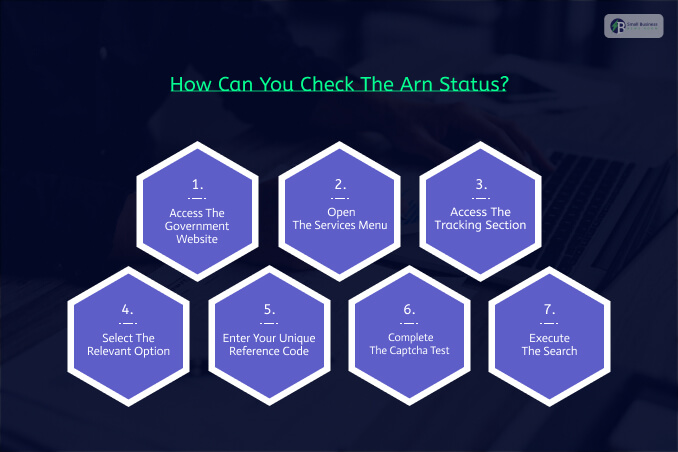
Checking your ARN status is a simple process that only takes a few minutes.
Therefore, it is essential to do so weekly. You do not need to log in to the secure dashboard to view your ARN status.
However, it is crucial that you have your reference code close at hand as you navigate the portal.
You can find the 15-digit alphanumeric code in the confirmation message the government sent to your email or phone after you submit your application for approval.
Only with the tracking code can you view the status of your GST registration application.
However, checking your GST registration status using the ARN is simple and effective. Hence, if you want to ascertain your status, follow the steps below:
Step 1: Access The Government Website
Launch your browser and navigate to the official portal at gst.gov.in.
Step 2: Open The Services Menu
On the homepage dashboard, locate the navigation tabs at the uppermost part of the page and click the Services tab.
Step 3: Access The Tracking Section
In the Services drop-down menu, hover over the pointer to reveal the other options, then select Track Application Status.
Step 4: Select The Relevant Option
On the application status tracking page, a drop-down menu will ask you to specify which application you want to track.
Hence, click the drop-down button and select the Registration option.
Step 5: Enter Your Unique Reference Code
After clicking the option above, a new window will appear, asking you to enter your unique reference code.
Click the ARN radio button and enter your 15-digit code in the space provided.
Step 6: Complete The Captcha Test
In the reference code section, you will see an image with a series of characters; enter them correctly in the CAPTCHA field to confirm your request.
Step 7: Execute The Search
Finally, double-check all the details that you have entered, and click the dark blue Search button at the end of the query section.
After you click the Search button, the portal will redirect you to a new page that displays your application’s processing history at the bottom of the page.
At the end of the processing trail, the current status of your GST registration approval request will appear.
If your application is approved, a green download button will appear, allowing you to save your approval notice on your device for future reference before your GSTIN is issued.
Things To Do If Your ARN Status Is Stuck
Even though the process of applying for GST registration seems simple, several issues could arise to hinder the smooth processing of your request for approval.
Accordingly, it is essential to check your application status to confirm it is not stuck.
This may indicate that the GST network requires additional information from you to proceed with the approval process.
Nevertheless, the following suggestions will help you identify the next step to take if your application is delayed:
- If your ARN status indicates that your application is pending clarifications, log in to your dashboard and locate the notice section.
After that, you can reply to the officer’s notice by submitting the required documents.
- If your application has been rejected, ascertain the reason for the denial by reviewing your notice, amend the issues highlighted by the officer, and resubmit your application for approval.
- If you encounter technical difficulties accessing your dashboard or the status code, send an official request to the GST helpdesk and provide full details of the problem you are facing.
Ultimately, complying with the requirements of the tax network can be stressful, particularly when starting your venture.
However, if you need help with registration, filing, or responding to notices for clarification, don’t hesitate to contact our experts.